



Precast Software for Design,
Production & Project Management

Precast Software for Design, Production & Project Management
Cast in Materials
Watch the video about Cast in Materials in IMPACT
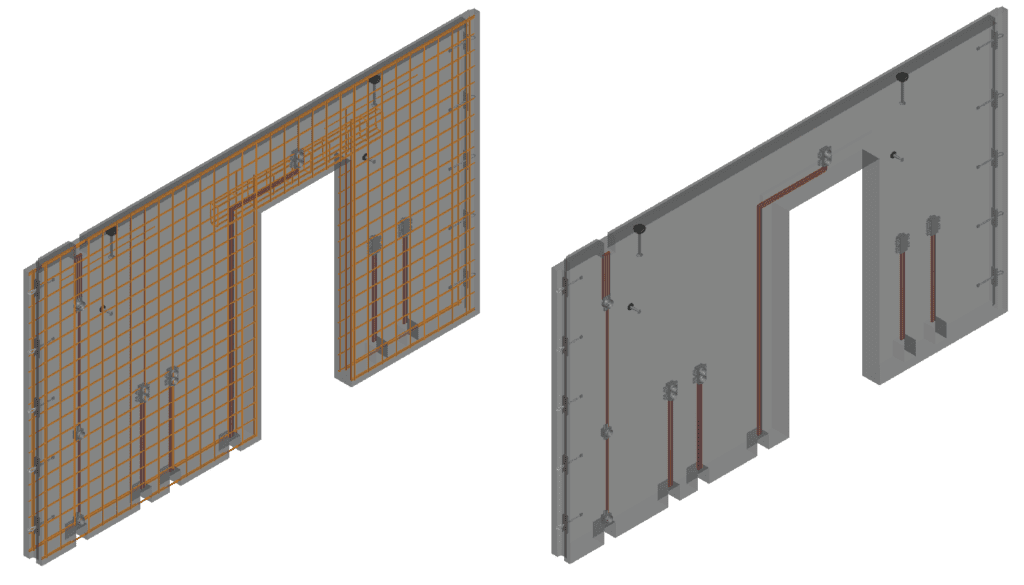
All Cast-in Materials in full 3D
All Cast in materials (CIM) or items in IMPACT are handled as full 3D entities (Or 2D, you decide how you want to model and detail it on the shop drawings). Working with highly automated tools and automatic material take-offs, the IMPACT Design software makes it easy to add or change items as your precast concrete project progresses.
Use tools such as Cast in material templates, for bulk inserting wire-loops, grout tubes, and similar. Or tools such as MEP keys to control electrical installations with pipes, electric boxes, and recesses.
Why wait? Click to apply for a Free Trial of IMPACT and get started today!
IMPACT Docs
Find detailed documentation and guides for the IMPACT precast software on the IMPACT Docs. Access is available for users with a login.
Request a Trial
Want to try IMPACT precast? Apply for a trial and get your login here. This gives you full access to the Docs and all software features during your trial period.
IMPACT Blog
IMPACT User Conference 2022 – Live stream of the event (Live from Malmö)
Tomorrow, we are hosting our annual IMPACT User Conference – Live from Malmö. We celebrate that this year, IMPACT […]

30th Anniversary of IMPACT: At the forefront of digitalizing the Precast Concrete Industry
This year, IMPACT turns 30 years old. Our flagship software to allow a cohesive flow of information in the precast concrete industry […]
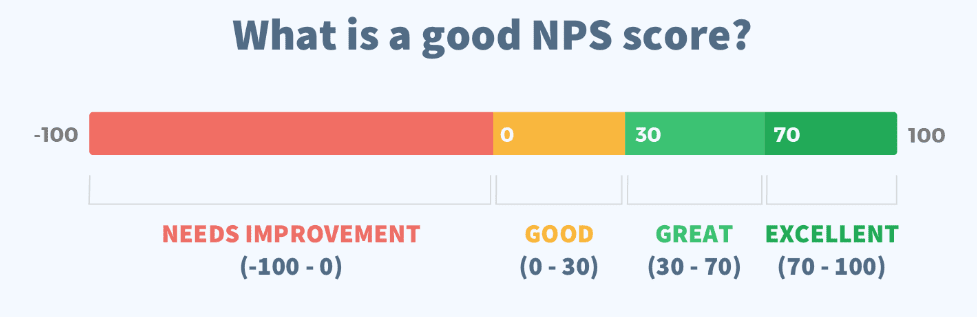
Net promoter score (NPS) and customer testimonial – IMPACT Precast Software
A small snippet of the customer testimonials we got through the NPS (See the rest at the end of the article)
- “Very useful software”
[…]

Bio: Nikolaj is Director Of Sales & Marketing for StruSoft´s Precast Business Unit. He has an MSc in Building Informatics, direct experience working for precast factories ...show more as well now being with StruSoft more than a decade. He is well equipped to answer any enquiry you might have about our IMPACT Precast Software. show less

Bio: Michał Sikora is the main point of contact for IMPACT customers in Poland. He is responsible for implementation, training and the optimization of IMPACT for ...show more customers. Michal has an MSc in Structural Engineering and an extensive experience in designing and detailing concrete structures. If you are based in Poland and want to find out how to get started and best utilize IMPACT, feel free to reach out to Michal. show less

Bio: Thomas Gitsas works closely new international IMPACT customers. He is responsible for implementation, training and the optimisation of the precast processes to be digitalised within ...show more IMPACT. Thomas has 2 x MSc's in structural engineering and civil planning. Thomas joined StruSoft in 2017 and has a wealth of experience with precast factories in Europe, UK, Middle East and Oceania. Please feel free to contact Thomas if you would like to find out more about to get started with IMPACT. show less

Bio: Linus works with implementations of all applications in the IMPACT system. He is also a specialist and interim Product Owner for IMPACT Revit. He has ...show more a B.Sc. in Civil Engineering, several years of experience in technical implementations. Please feel free to contact Linus if you have any questions of how to best utilise your IMPACT software. show less

Bio: Peter Karlsson is the Director and main person responsible for StruSoft's Precast Business Unit. He has been with StruSoft since 1999 and has many years' ...show more of experience helping new customers starting up and also supporting existing customers to get the most from the IMPACT precast software. Peter is mainly focused on customer relationships and sales in the Swedish market. He is also a member of StruSoft's Senior Management Team. show less

Bio: Suhas is the Managing Director of StruEngineers India, a Design & Detailing Service company 100% owned by StruSoft. Suhas has a BSc in Civil Engineering ...show more and has been providing design support services to the Precast Industry, worldwide, over the last 20 years. Suhas was one of the original founders of StruEngineers which was established 10 years ago and previously worked for Neilsoft in Pune. StruEngineers provides local support in India for all StruSoft software and Suhas is a specialist with IMPACT AutoCAD. If you are based in India and looking for more information or support please feel free to get in touch directly with Suhas. show less