



Precast Software for Design,
Production & Project Management

Precast Software for Design, Production & Project Management
Excel import to IMPACT
The Excel Import tool in IMPACT enables you to get started planning your projects, production and transport with minimal design information.
Precast projects don’t start life with a detailed 3D model. In fact, 3D model data, and shop drawings might not be ready up until the day before you need to cast the precast elements, which can be a real headache for planning production.
This is often a limitation of 3D model-based production software as you need to be able to plan, order materials, reinforcement and accurately book out mould/table/bed/transport capacity in parallel of the critical path of the design department.
Watch a Quick Overview Video on the Excel Import to IMPACT
A practical solution for early precast planning
This simple innovation allows you to fast track your precast planning by importing precast elements project directly from an Excel spreadsheet. Quickly define in Excel the geometry of walls, slabs, columns, beams—even custom shapes, holes & recesses and then import directly into the IMPACT 3D project manager to start adding ID’s, dates and plan production & transport etc. in just a few clicks.
No 3D model? No problem
Start planning moulds, beds and element IDs early—even before CAD data is available.
Use familiar tools
Create elements in Excel using a template. No specialist design software needed.
Link PDF/DWG drawings from Excel
It is possible to add Drawings, PDFs, Cast in Materials, Reinforcement, Recesses and Drawing specifications to the imported elements, using an extended Excel file.
Create Custom Shapes and Recesses
Import more detailed elements with the option to use recesses, circular or rectangular, to quickly create the precast elements as close as possible to the future designs.
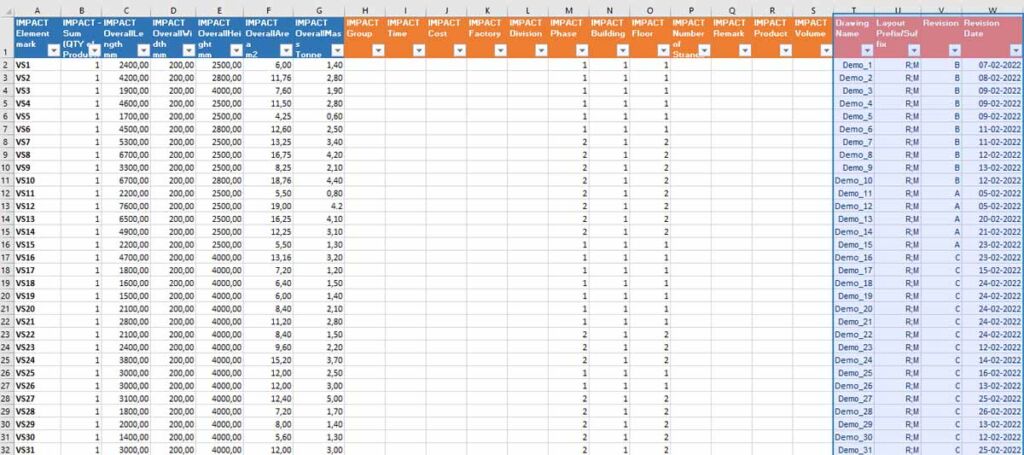

The Excel Import to IMPACT is an easy way to try out the software
Great for new users or production teams to get hands-on with IMPACT without having to use 3D model or CAD data.
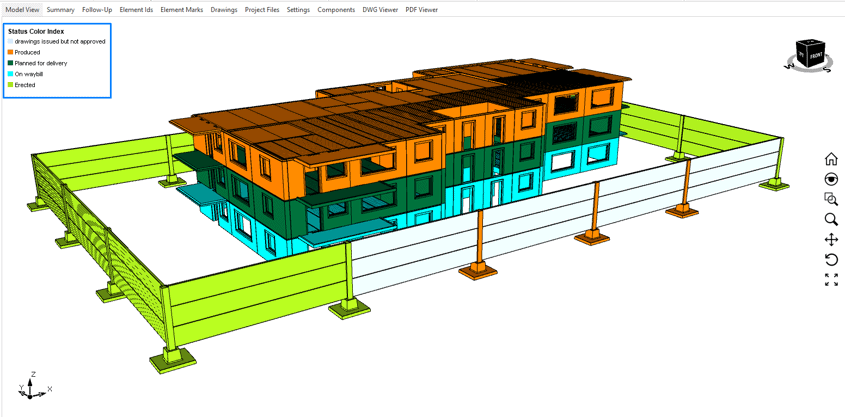
As shown in the images above, a few lines in Excel become a 3D overview of linked elements inside IMPACT. These elements are immediately available for:
- Assigning IDs and attributes such as dates
- Production scheduling and tracking
- Linking shop drawings including cast in materials and reinforcement
- Generating basic reports
This lightweight import workflow helps bridge the gap between complex design data and tight production schedules.
If you want to find out more about the Excel import into IMPACT, you can get a free trial by clicking on the button below.
IMPACT Docs
Find detailed documentation and guides for the IMPACT precast software on the IMPACT Docs. Access is available for users with a login.
Request a Trial
Want to try IMPACT precast? Apply for a trial and get your login here. This gives you full access to the Docs and all software features during your trial period.
IMPACT Blog

Struggling with planning precast projects in Excel?
With the rise of digitisation; advancements in BIM, many precast businesses have moved to 3D design of their precast concrete projects. However, many factories and […]
Hollowcore Wall Panels Design
At StruSoft, we build tools that make precast design and production easier, not harder. That’s why we’re excited to introduce a new addition to the […]

IMPACT Environmental: Future-Proof Your Precast Concrete
Streamline Sustainability Compliance with IMPACT Environmental
The construction industry is facing a wave of new sustainability regulations, with stricter Life Cycle Assessment (LCA) […]

Bio: Nikolaj is Director Of Sales & Marketing for StruSoft´s Precast Business Unit. He has an MSc in Building Informatics, direct experience working for precast factories ...show more as well now being with StruSoft more than a decade. He is well equipped to answer any enquiry you might have about our IMPACT Precast Software. show less

Bio: Michał Sikora is the main point of contact for IMPACT customers in Poland. He is responsible for implementation, training and the optimization of IMPACT for ...show more customers. Michal has an MSc in Structural Engineering and an extensive experience in designing and detailing concrete structures. If you are based in Poland and want to find out how to get started and best utilize IMPACT, feel free to reach out to Michal. show less

Bio: Thomas Gitsas works closely new international IMPACT customers. He is responsible for implementation, training and the optimisation of the precast processes to be digitalised within ...show more IMPACT. Thomas has 2 x MSc's in structural engineering and civil planning. Thomas joined StruSoft in 2017 and has a wealth of experience with precast factories in Europe, UK, Middle East and Oceania. Please feel free to contact Thomas if you would like to find out more about to get started with IMPACT. show less

Bio: Linus works with implementations of all applications in the IMPACT system. He is also a specialist and interim Product Owner for IMPACT Revit. He has ...show more a B.Sc. in Civil Engineering, several years of experience in technical implementations. Please feel free to contact Linus if you have any questions of how to best utilise your IMPACT software. show less

Bio: Peter Karlsson is the Director and main person responsible for StruSoft's Precast Business Unit. He has been with StruSoft since 1999 and has many years' ...show more of experience helping new customers starting up and also supporting existing customers to get the most from the IMPACT precast software. Peter is mainly focused on customer relationships and sales in the Swedish market. He is also a member of StruSoft's Senior Management Team. show less

Bio: Suhas is the Managing Director of StruEngineers India, a Design & Detailing Service company 100% owned by StruSoft. Suhas has a BSc in Civil Engineering ...show more and has been providing design support services to the Precast Industry, worldwide, over the last 20 years. Suhas was one of the original founders of StruEngineers which was established 10 years ago and previously worked for Neilsoft in Pune. StruEngineers provides local support in India for all StruSoft software and Suhas is a specialist with IMPACT AutoCAD. If you are based in India and looking for more information or support please feel free to get in touch directly with Suhas. show less